

 Mar 14,2026
  By Dave
We’ve been busy making Raviga smarter, faster, and easier to use — especially when it comes to managing your settings, portal experience, and day-to-day workflow.
This is a big one. We’ve redesigned your entire settings experience, made a proper pass over the customer portal, improved how invoices and documents work, and squashed a couple of bugs that have been bugging us (and probably you too).
Redesigned Settings
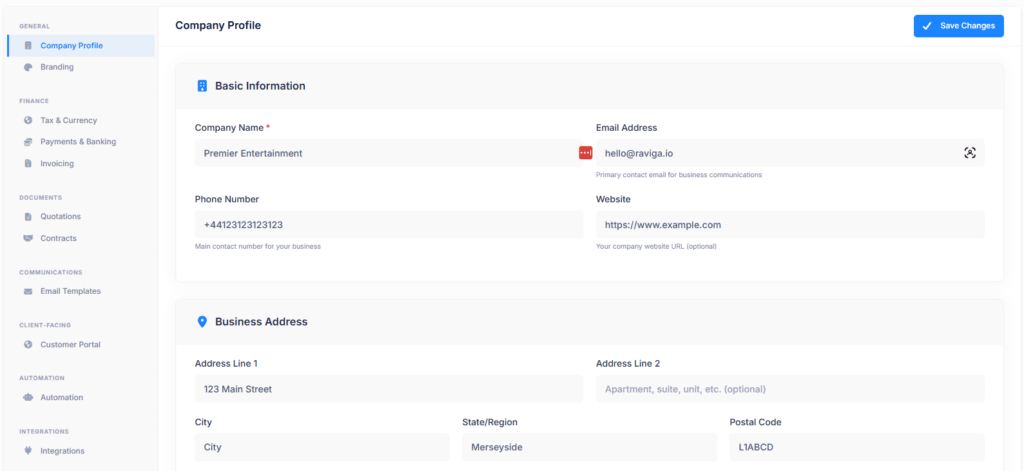
Your settings have had a complete overhaul. Everything is now organised into dedicated pages with a clean sidebar navigation — no more hunting through tabs to find what you need.
- Company Profile & Branding are now separate pages, so identity and visual settings don’t get tangled
- Invoicing, Quotations, and Contracts each have their own dedicated settings page
- Automation brings a brand new page for managing your event lifecycle rules
- Integrations – your calendar feed and future integrations now live here
Customer Portal Improvements
We’ve made a big pass over the customer portal, fixing bugs, filling gaps, and polishing the experience for your customers.
- Quotation review: clients can now expand and review line items directly in the portal, without needing to re-download the PDF
- Contact management: a new Contacts tab in the portal lets clients manage their own contact details
- Shared files: you can now upload and share files back to your clients from the admin side
- Email improvements thread direction and sender labels are now correct, and you can now send follow-up emails without waiting for a reply
- Outstanding balance: voided invoices now correctly reduce the balance back to zero
- Add-on invoicing: when an add-on is added to an event, you can now generate an invoice for the difference
Invoice & Document Improvements
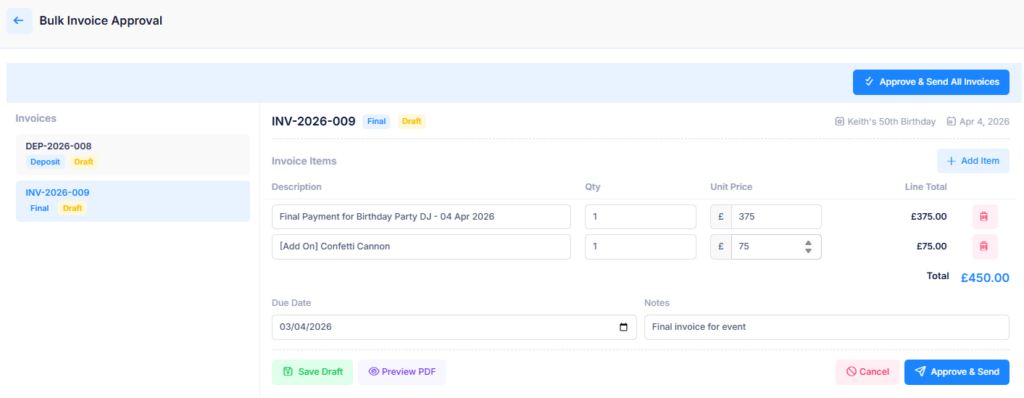
- Invoice review redesigned: the invoice blade now supports inline editing with a cleaner layout
- PDF preview before sending: preview the fully-rendered invoice email before it goes to your client
- Event end times: quotation and contract templates now include the event end time
- Add-on totals: add-ons are now included in the event total fee calculation
Email System
- Template improvements: portal email templates have been fixed and improved across the board
Bug Fixes
- Fixed the floating save button on business settings
- Fixed the portal logo constantly refreshing on the email tab
- Fixed the “no events” icon positioning on the portal dashboard
- Email verification now correctly refreshes your session
- Invoice approve button no longer disappears after sending one invoice
- Mobile layout and dark mode fixes across the platform
Summary
Version: v20260315
| What’s New | What It Does |
|---|---|
| Redesigned Settings | Clean sidebar navigation with dedicated pages for profile, branding, invoicing, contracts, automation, and integrations |
| Customer Portal — Quotation Review | Clients can expand and review line items directly in the portal |
| Customer Portal — Contacts | New Contacts tab lets clients manage their own contact details |
| Customer Portal — File Sharing | Upload and share files back to clients from the admin side |
| Customer Portal — Add-on Invoicing | Generate invoices for the difference when add-ons are applied |
| Invoice Preview | Preview the fully-rendered invoice email before sending to clients |
| Invoice Inline Editing | Redesigned invoice blade with cleaner layout and inline editing |
| Event End Times | Quotation and contract templates now include the event end time |
What’s Next?
We’re continuing to build out features that help you spend less time on admin and more time doing what you actually enjoy. If you’ve got feedback on this update — or ideas for what would make your life easier — we’d love to hear from you.
Cheers, The Raviga Team
Already using Raviga? Log in to try the new features. New here? Start your free account and see what all the fuss is about.